
A well-planned office move can keep disruption manageable: schedule the transfer for evenings, weekends or holiday breaks, or move departments in phases over several weeks or months. Begin planning 6–12 months ahead; larger organisations with complex IT, specialised equipment or regulatory requirements typically need 12–18 months. That’s the practical starting point for minimising business downtime during a move.
It’s understandable to worry about lost work, misplaced equipment and employees unsure where to begin. A clear timeline, assigned responsibilities and careful preparation of technology and documents can help your Adelaide business stay focused through the move.
This guide explains how to plan the move, prepare employees, organise equipment and records, and coordinate IT and communications. It also covers what to consider when choosing commercial removals support, so you can make informed decisions and help your team settle into its new workspace with less disruption.
Key Takeaways
- Build a relocation timeline that covers each stage, assigns clear owners and leaves room for unexpected delays.
- Start employee communications two months before the move so staff understand key dates, responsibilities and workflow changes.
- Inventory and label equipment, furniture and documents by department or destination, and coordinate IT disconnection and reconnection.
- Test the new IT environment before staff return to work, and let clients know if any services will be temporarily offline.
- Choose a commercial removals company whose relocation support fits your move, and coordinate the critical logistics together.
1. How do you minimize downtime during office relocations?
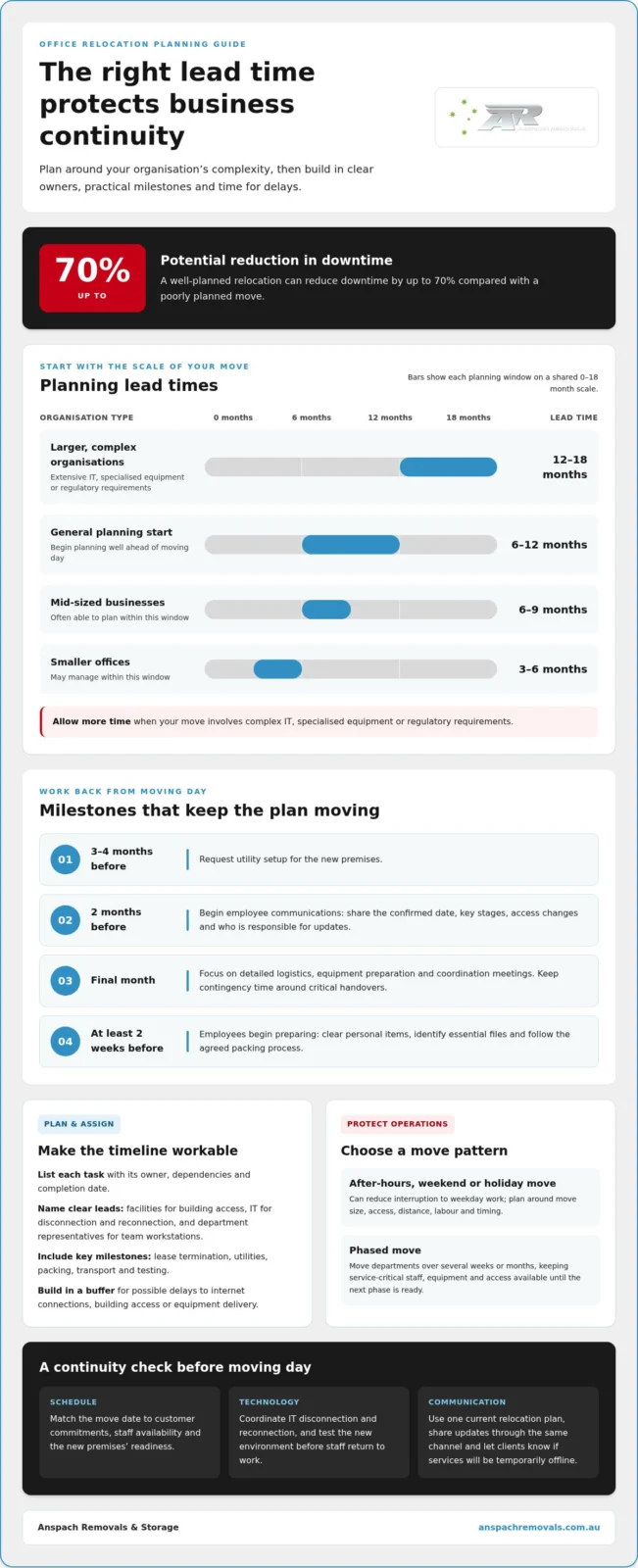
Start planning an office relocation early, then build a documented timeline from lease decisions through to IT setup. Planning generally begins 6–12 months before moving day. Larger organisations with extensive IT, specialised equipment or regulatory requirements typically need 12–18 months. Mid-sized businesses can often plan over 6–9 months, while smaller offices may manage within 3–6 months.
Turn the timeline into a working plan, not just a list of dates. Include each task, its owner, dependencies and completion date. For example, assign facilities staff to coordinate building access, an IT lead to schedule disconnection and reconnection, and department representatives to prepare team workstations. Add lease termination, utility setup, packing, transport and testing milestones. Businesses should request utility setup 3–4 months before the relocation.
Set the move date once you understand key business needs and the readiness of both sites. Moving the operation over a weekend or holiday can reduce interruption to weekday work, while an after-hours or weekend schedule should be planned around the move’s size, access, distance, labour and timing. Request a written quote to understand the arrangements for your move. Match the schedule to customer commitments, staff availability and the new premises’ readiness.
Build contingency time into the plan. Use the final month for detailed logistics, equipment preparation and coordination meetings, and allow extra time around critical handovers. A buffer for delays to internet connections, building access or equipment delivery can stop one missed milestone from disrupting business operations. Identify who can approve schedule changes and who needs to be notified when a task falls behind.
Phasing can keep essential functions operating while departments move over several weeks or months. For instance, transfer a support team after its replacement work area and systems are ready, then move another department once the first is functioning. Keep service-critical staff, equipment and access arrangements available at the original site until the next phase is ready. A well-planned relocation can reduce downtime by up to 70% compared with a poorly planned move. This structured approach makes minimizing business downtime during a move a practical planning goal, rather than an assumption.
2. What should employees do before and during the relocation?
Clear communication helps employees prepare for change and keeps everyday work moving. Begin the communication campaign two months before the office relocation. Share the confirmed move date, key stages, expected changes to access and the person responsible for each update. Keep one relocation plan as the reference point, so teams aren’t working from conflicting versions.
Give employees practical instructions, not just a moving-day announcement. Explain when to pack, what must remain available until the move, and how to flag equipment or access needs. Ask employees to begin preparing at least two weeks before moving day. For example, have each person clear personal items, identify essential files and follow the agreed packing process.
Set up a communication structure that reaches every department. Assign a move coordinator and a representative from each department to relay instructions and collect questions. Representatives can confirm staff lists, note special handling needs and report tasks that are falling behind. Send regular timeline updates, and share any changes through the same channel so employees know which information is current.
Make packing labels useful at both ends of the move. Mark each box and furniture item with its department, destination room or employee name. Share the new floor plan with staff and movers, and use consistent room names across the plan and labels. For instance, a box marked “Finance, Room 3” is easier to direct than one labelled only “Office”. Clear labels reduce misplaced items and help teams find their work areas sooner.
Before moving day, explain how staff should prepare their workstations. Employees can save and close work, follow IT instructions for devices, and keep essential documents separate from general packing. Managers should identify which tasks can continue remotely and agree on approved ways to access shared files and communicate. If remote work isn’t practical for a team, plan how its essential duties will be handled during the transition.
During the relocation, department representatives can confirm that staff have followed packing instructions and report urgent issues to the coordinator. Set a simple check-in process for the move, such as reporting when a team’s equipment has arrived and its workspace is ready. This creates a clear handover without asking every employee to chase updates. A planned office and commercial relocation can also align the physical move with staff responsibilities, helping teams return to work with fewer avoidable hold-ups.
3. Organising and labelling equipment, documents and furniture
Start with an inventory of office equipment, furniture and technology. Record each item’s department, condition and destination room, then use the inventory to track its movement. A spreadsheet can group items by team, such as Finance, reception or customer support. Mark surplus supplies for separate handling so they aren’t accidentally loaded with equipment needed on the first day.
Use one labelling format across cartons, furniture and the floor plan. Include the department, destination room and, where useful, the employee’s name. For example, label a desk “Accounts, Room 2” and its monitor “Accounts, Room 2, workstation 4”. Share the new office layout with staff and movers before packing begins. Matching labels to room names helps direct each item correctly during the transition.
Protect equipment by preparing it for transport, rather than placing loose items in boxes. Use suitable packing materials, padding and dollies for office equipment, and keep cables with their devices in labelled bags. Photographing cable connections before disconnection gives the IT team a visual reference at the new site. Keep fragile or specialised equipment clearly identified so it receives the right handling.
Before computers, servers and network devices are moved, securely back up business data. Ask the IT team to coordinate disconnection, transport and reconnection, and identify which devices must be operational first. For example, prioritise the network equipment and essential workstations used by reception or customer service. Keep backup access separate from the equipment being transported, so staff can retrieve critical files if setup takes longer.
For internet, phone and utility transfers, contact the relevant providers, arrange connections at the new address and schedule closure or transfer at the old site. Request utility setup 3–4 months before an office relocation, and align internet and phone activation with the IT setup schedule. Record appointment dates and account details in the relocation plan, then test each connection before employees rely on it.
On arrival, use the inventory and floor plan to check deliveries by department. Have each department representative confirm that furniture, supplies and technology reached the right rooms, and report missing or damaged items promptly. After IT reconnects equipment, test network access, phones, printers and shared drives at the workstations that need them. This step-by-step coordination helps staff resume work without searching for misplaced equipment.
4. Tips: How Do Businesses Minimize Downtime During a Commercial Move?
Give one move coordinator authority to manage decisions and keep the schedule current. The coordinator can bring together department representatives, IT staff, building contacts and movers. Use a shared action register that names each task, owner, deadline and status. List loading access, server shutdown, key collection and workstation testing separately, rather than relying on one broad “move day” entry.
Agree on a communication rhythm before relocation work begins. The coordinator can circulate weekly updates, then switch to brief daily updates as the move approaches. Include changes, outstanding actions and the person responsible for resolving each issue. If a delivery time shifts, notify affected teams promptly, rather than letting them discover the change while waiting onsite.
Technology needs its own coordination stream. Involve internal IT staff and relevant vendors early, then map internet, phone, network and application dependencies. Plan IT infrastructure 2–3 months in advance, and move critical applications or data to cloud platforms weeks before the relocation where appropriate. Have IT test the new environment before employees return onsite. Technology infrastructure accounts for 60–70% of downtime related to business relocations, so clear ownership and testing matter.
Coordinate the movers around the building’s practical constraints. Share access instructions, loading areas, lift arrangements, floor plans and priority equipment lists before moving day. Confirm the loading and delivery sequence with the coordinator so essential work areas can be set up first. A backup plan should identify who can authorise a change if access is delayed or a delivery arrives out of sequence.
For an Australian commercial move, build the WHS plan around identified hazards and practical controls. Walk both sites before moving day, keep exit routes clear, separate staff from active loading areas, and agree how heavy or awkward items will be handled. Record who reports hazards and who pauses work if conditions change. Follow the relevant workplace procedures for each site.
Finally, communicate customer impacts before teams go offline. Tell clients which services may be interrupted, when to expect updates and how to reach the business during the transition. HR and management can keep staff and stakeholders aligned, while the coordinator tracks unresolved issues. A smooth move depends on this shared picture: movers, IT vendors and employees each know their next task, its timing and who to contact if plans change.
5. Hiring a commercial removals company
A commercial move involves more than shifting desks. It brings together building access, furniture, sensitive equipment, IT infrastructure and staff schedules. An Adelaide removals team can manage the physical relocation while your internal coordinator keeps business decisions moving. Define responsibilities early, so everyone knows who handles packing, access instructions, priority items and delivery sequencing.
Start with a clear scope of work. Record what needs moving, which items require careful handling and what must be ready first at the new premises. Reception desks, workstations and essential storage may need priority over surplus furniture. Share floor plans, inventories, access details and timing constraints with the removals team to give everyone a common operational picture.
Coordination matters as much as transport. Agree on a single point of contact and how schedule changes will be communicated. The removals team can align loading and delivery with your internal project lead, while your IT team manages disconnection and reconnection. If a server room or specialised equipment needs separate timing, make that dependency visible in the move plan. Where relocations involve bulky plant or machinery that demands dedicated lorry-mounted crane hire and transport—an approach detailed by haulage specialists such as bewlake.com—contractor timings must be locked in well before moving day.
A commercial removals company may provide a dedicated project manager to coordinate the relocation from planning through completion. This can help keep tasks connected, particularly when several departments or delivery stages are involved. The project manager can track key logistics, such as building access, item sequencing and workspace setup, while your staff focus on business operations. Similarly, organisations coordinating broader supply chain freight or cross-border cargo alongside a major facility transition can turn to freight forwarders like dubointl.com to keep commercial shipments moving reliably.
Protect productivity by planning where furniture and equipment will go at the destination. Use the agreed floor layout to guide delivery, then arrange work areas and unpack priority items before staff return. A team expected to resume customer support first, for example, needs desks, computers and phone equipment positioned in the correct work area. Clear room labels reduce confusion during unloading.
Before the move, discuss how sensitive or fragile items will be prepared and handled. Identify equipment that needs special attention, and keep confidential documents separate from general office contents. Your IT staff should manage technology backups and system testing; the removals team can coordinate the physical move around those tasks. This avoids expecting movers to perform technical work outside their role.
The right commercial removals support is practical, clearly scoped and coordinated with your own team. If you’re preparing an office move, plan your commercial relocation around your priorities, site access and the order your teams need to resume work.
Anspach Removals & Storage: Local Moves
Anspach Removals & Storage offers Office & Commercial Relocations for businesses planning a move and aiming to limit disruption. Bring your relocation timeline, floor plan and priority equipment list together early, so the physical move can align with your team’s operational needs.
Whether you’re moving a small office or coordinating a complex workplace transition, plan around what staff need to resume work: furniture in the right areas, equipment delivered to its destination and clear coordination with your internal IT team. Anspach Removals & Storage also handles Local Moves, Country Moves and Interstate Moves. If you need storage between stages, Hendon’s Self Storage is the recommended storage partner.
Contact Anspach Removals & Storage to discuss your commercial relocation, or visit anspachremovals.com.au.
Set your next workplace up for a confident start
A relocation is also a chance to shape how your team begins work in its new space. Think beyond moving day: decide which work areas should be ready first, how teams will reconnect with customers and what practical adjustments will help staff settle in. A deliberate approach to minimizing business downtime during a move can support a more organised return, with clear priorities guiding the first days at the new premises.
Anspach Removals & Storage handles Local Moves, Country Moves, Interstate Moves and commercial relocations. The right moving support depends on your business’s route and the transition it needs. Share your priorities and destination to start planning the next step.
Contact Anspach Removals & Storage about your move, and take the next step towards your new workplace with a clear plan.
Frequently Asked Questions
How do you minimize downtime during office relocations?
Reduce disruption by matching the move sequence to the order your teams need to work. For example, arrange for a customer-facing team’s work area to be ready before less-used meeting rooms. Identify what must function on the first day, then plan delivery and setup around those priorities. Minimizing business downtime during a move also means having a fallback for delayed access, equipment or internet connections.
How do you keep IT systems running during an office move?
Plan continuity with your IT team, and test essential systems at the new site before staff return. Securely back up business data before equipment is disconnected, then agree who handles shutdown, transport and reconnection for each device. If critical applications or data can be moved to cloud platforms, arrange this well before the relocation. Prioritise the network, phones and systems your teams need to serve customers.
How far in advance should you plan an office relocation?
Start an office relocation generally 6–12 months before the intended move date. The right lead time depends on the organisation’s size and complexity: a smaller office may plan over 3–6 months, while a mid-sized business may need 6–9 months. Extensive IT infrastructure, specialised equipment or regulatory requirements can make 12–18 months of preparation more appropriate. Build in time for decisions, site readiness and coordination.
Tips: How Do Businesses Minimize Downtime During a Commercial Move?
Give one coordinator responsibility for keeping the move plan, decisions and updates aligned. Have the coordinator connect department leads with IT staff, building contacts, vendors and movers. For example, coordinate network installation with furniture delivery so IT can set up systems without waiting for workstations to arrive. Let customers know in advance if services may be temporarily offline, and tell staff who will communicate changes.
What should employees do before and during the relocation?
Employees should prepare at least two weeks before moving day by following packing instructions, clearing personal items and identifying what they need to work. During the move, they should follow department-specific directions and report missing equipment or access problems to their representative. Managers can clarify which duties continue remotely and how staff should stay in touch. Keep urgent work and essential records accessible according to the agreed plan.
What’s the difference between phased and complete office moves?
A phased move transfers departments or functions in stages, potentially over several weeks or months, so some operations can continue while others relocate. A complete move transfers the whole operation together, often over a weekend or holiday period. Phasing can suit businesses that need ongoing access to particular teams or systems; a single transfer may suit an operation able to pause and restart as one unit.
What is the best timeline for planning an Australian business relocation?
Choose a timeline based on the complexity of the move, not a one-size-fits-all schedule. Smaller offices may plan over 3–6 months, mid-sized businesses over 6–9 months, and larger organisations with extensive IT or specialised requirements over 12–18 months. Request utility setup 3–4 months ahead, then reserve the final month for detailed logistics, equipment preparation and coordination meetings. Include contingency time for delays.
How can businesses create a move plan that minimises operational downtime?
Start with an inventory of essential functions, equipment and dependencies, then turn each requirement into a task with an owner and deadline. For example, link a team’s return date to workstation delivery, network access and system testing. Include communication steps for employees and customers, plus a fallback for delayed access or connections. Review the plan with department representatives so handovers and priorities are clear across the business.